Law firm workflow automation is no longer a luxury reserved for large City firms with dedicated IT departments. For small and mid-size practices, automating routine legal processes is now one of the most practical steps a firm can take to remain competitive, compliant, and profitable. Whether you are managing a two-partner high street firm or a growing team of fifteen fee earners, the operational drag of manual processes — chasing client documents, copying data between systems, drafting standard correspondence — consumes billable hours that could be directed elsewhere.
This guide offers a clear, operational roadmap for solicitors and practice managers ready to implement automation sensibly and sustainably. We cover the most valuable areas to automate, the tools worth considering, and the common pitfalls to avoid.
The pressure on smaller practices has never been greater. Rising operational costs, increasing client expectations, and a regulatory environment that demands meticulous record-keeping mean that firms relying entirely on manual processes are fighting with one hand tied behind their backs.
Consider the time a fee earner spends on tasks that generate no direct revenue: re-entering client data, chasing incomplete intake forms, manually creating engagement letters, or updating a matter file across multiple spreadsheets. Research by the Solicitors Regulation Authority consistently highlights administrative burden as a key barrier to smaller firms operating efficiently.
Automation addresses this directly. When repetitive, rule-based tasks are handled by software, your team’s focus returns to legal work — the activity clients pay for and value.
The specific benefits for small and mid-size practices include:
Not every task in a legal practice can or should be automated. The sweet spot is processes that are high-frequency, rule-based, and time-consuming. Below are the five areas where small and mid-size firms consistently see the greatest return.
Client intake is often the most manual-intensive part of a firm’s operation. Collecting contact information, running conflict checks, obtaining identification documents, and issuing engagement letters involves multiple steps that are ripe for automation.
An automated intake workflow can present a branded digital questionnaire to prospective clients, trigger an automatic conflict check, and — once cleared — generate a tailored client care letter and matter opening record without a member of staff needing to intervene. SpineLegal’s client onboarding tools are designed specifically for this workflow, reducing the average onboarding time from days to hours.
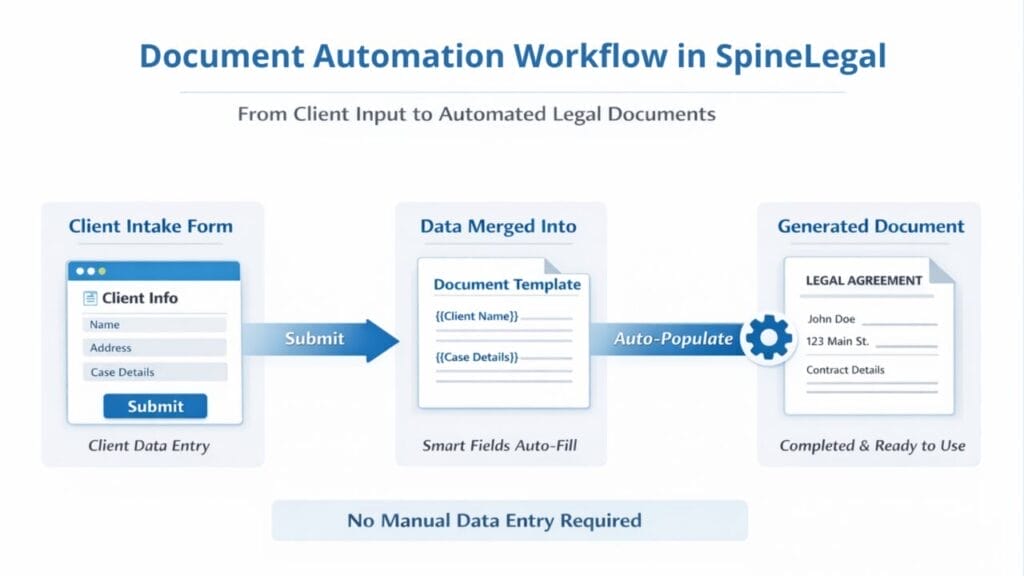
Standard legal documents — residential conveyancing reports on title, non-disclosure agreements, employment contracts, straightforward wills — follow predictable structures. Document automation software uses templates with conditional logic and variable fields, assembling a complete draft from information already stored in the matter file.
The practical impact is significant: a document that previously took a fee earner forty-five minutes to draft from a precedent can be produced in under five minutes, and with greater consistency.
Missed deadlines represent one of the most serious risks in legal practice — whether a limitation period, a Land Registry priority search window, or a Companies House filing date. Automated task workflows assign deadlines, send reminders, and escalate overdue actions without relying on a paper diary or a fee earner’s memory.
Linking task automation to matter milestones means that when a matter moves from one stage to the next, the associated tasks, documents, and communications are triggered automatically.
Clients increasingly expect proactive communication. Automating routine status updates — confirmation of receipt, acknowledgement of documents, progress milestones — keeps clients informed without consuming fee earner time. Automated communication can also prompt clients to complete outstanding actions, reducing the back-and-forth that delays matter progression.
Leakage in time recording is a chronic problem for smaller practices. Automation can prompt fee earners to record time at regular intervals, pre-populate time entries based on completed tasks, and trigger bill generation when a matter reaches a defined stage. Integrating billing automation with your practice management software closes the gap between work done and work billed.
The market for legal technology has expanded rapidly. The challenge for small and mid-size firms is not finding automation tools — it is identifying the right ones for their specific practice area, team size, and existing infrastructure.
When evaluating legal workflow software, consider the following criteria:
A common mistake is selecting enterprise-level software designed for large firms and expecting it to work seamlessly in a practice of six fee earners. Tools built with small and mid-size practices in mind — those that understand the constraints of limited IT resource and tight margins — typically deliver faster implementation and better adoption.
Implementing workflow automation without a clear strategy is one of the most common reasons firms fail to realise the benefits. The technology is rarely the obstacle; poor planning and weak change management are.
Follow this sequenced approach to build an effective automation programme:
Before automating anything, document how work currently flows through the practice. For each key matter type, trace every step from client enquiry to file closure. Identify where time is lost, where errors occur, and where staff frustration is highest. This process often reveals inefficiencies that can be resolved before any technology is introduced.
Not all workflows are equal. Prioritise automation projects based on two factors: the volume of the process (how often does it happen?) and the cost of the status quo (how much time or risk does the manual approach carry?). Start with high-volume, low-complexity processes where quick wins are achievable.
Automate one workflow at a time. Configure the process, run it with a small group of users, gather feedback, and refine before rolling out practice-wide. Resist the temptation to automate everything simultaneously — this approach overwhelms staff and makes it difficult to diagnose problems.
Automation only works if the people using it understand why it exists and how to use it. Invest time in training, communicate the benefits clearly, and designate an internal champion who can support colleagues through the transition.

Firms that struggle with automation typically make one or more of the following mistakes:
Every automation initiative should be evaluated against measurable outcomes. For legal practices, the most meaningful metrics typically include:
Reviewing these metrics quarterly gives a clear picture of where automation is delivering value and where further refinement is needed. SpineLegal’s reporting and analytics features allow practice managers to track operational performance directly from the platform.
What is law firm workflow automation?
Law firm workflow automation refers to the use of software to handle repetitive, rule-based tasks within a legal practice automatically — without requiring manual intervention at each step. Common examples include automated client onboarding, document generation, task assignment, deadline reminders, and billing prompts. The goal is to reduce administrative overhead, minimise errors, and free fee earners to focus on legal work.
Is workflow automation suitable for small law firms?
Yes. Automation tools designed for small and mid-size practices are widely available and increasingly affordable. Smaller firms often see proportionally greater benefits because individual fee earners carry higher administrative loads. Starting with one high-volume workflows such as client intake or standard document assembly — allows a small firm to demonstrate value quickly before expanding the programme.
How do I ensure automated workflows comply with SRA requirements?
Automated workflows must be configured to reflect your professional conduct obligations. Client care letters, engagement terms, and any communications generated automatically should be drafted and reviewed by a qualified solicitor before deployment. Your practice should also ensure that all data processed through automation tools complies with UK GDPR obligations. Regular audits of automated outputs are recommended to catch any drift from required standards.
How long does it take to implement legal workflow automation?
Implementation timelines vary depending on the complexity of the workflows and the readiness of your existing systems. A single automated intake workflow, for example, can typically be configured and live within two to four weeks. A broader automation programme covering multiple practice areas and integrations will take longer — but incremental deployment allows firms to begin realising benefits quickly while the wider rollout continues.
Ready to automate your law firm’s workflow?
Discover how SpineLegal simplifies processes, reduces manual work, and keeps your firm running efficiently. Book a free demo today.